Categories
Uncategorized

An Introduction to Ableton Live: A Beginner’s Guide

Ableton Live is a popular digital audio workstation (DAW) used by musicians, producers, and DJs to create, record, mix, and perform music. If you’re new to Ableton Live, getting started can seem daunting. But don’t worry, I have listed a few key concepts below to help you start creating music in no time.

Concept 1: Session View
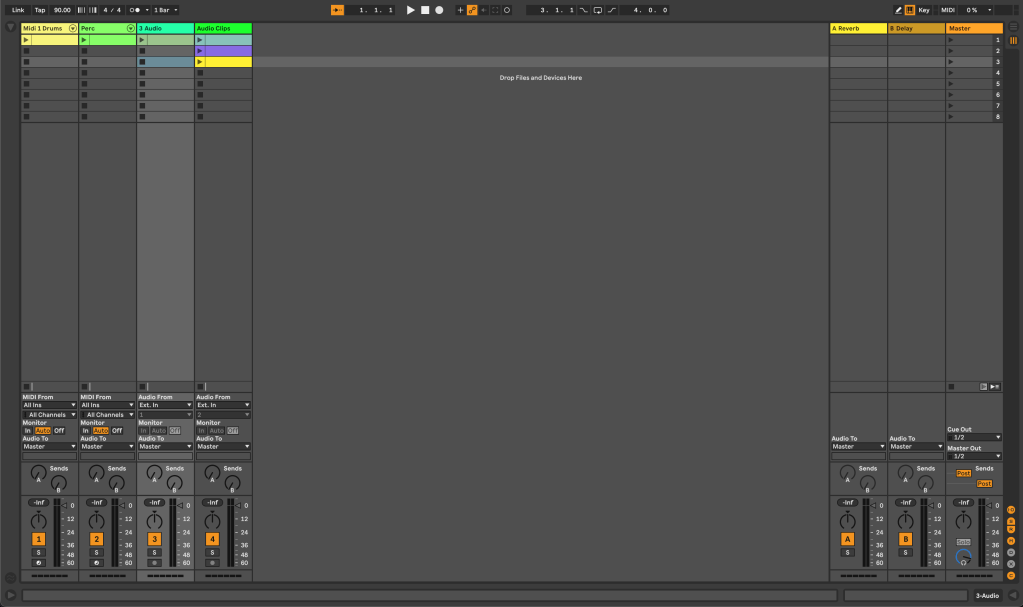
Session View is the first interface you see when you open the Live. This matrix-looking grid is the DAW’s unique feature, where you can create and launch audio and MIDI clips in a non-linear fashion. The columns are the project’s Tracks, the rows are called Scenes, and the individual boxes are called Clip Slots. Each clip can be launched independently, but each Track can only play one at a time. You can also record audio into clips and use them as building blocks for your song. It is an ideal feature for live performance and improvisation.

Concept 2: Arrangement View
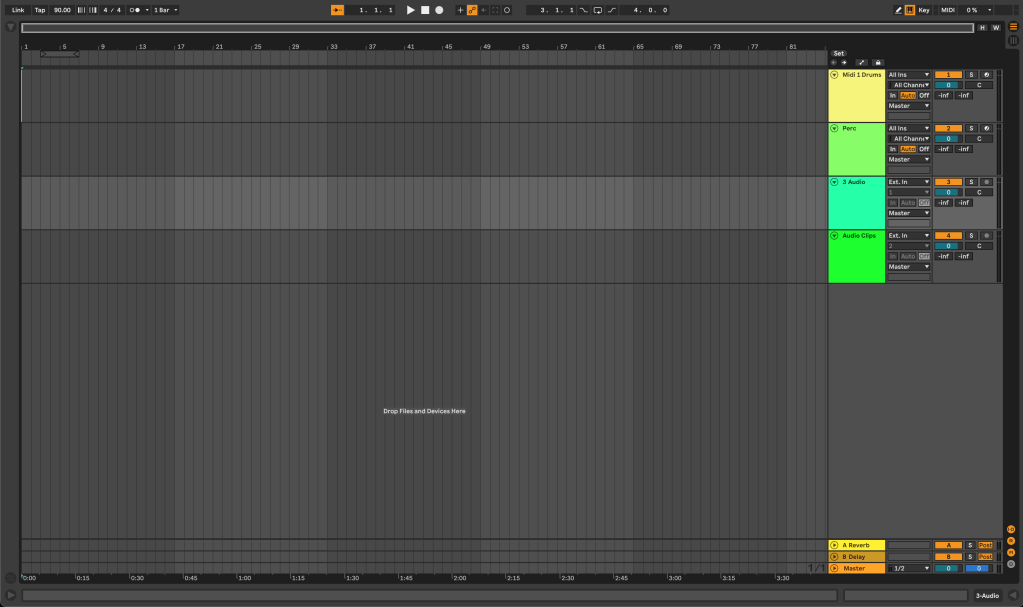
Arrangement View is the traditional linear view that you are probably familiar with in other DAWs. Here, you can arrange, edit, and mix your clips into a finished song. You can add effects, adjust volumes, and pan your tracks, as well as add additional tracks and make detailed edits to your audio and MIDI clips. This view is ideal for long form recording and arranging of your music.

Concept 3: Instruments and Effects

Ableton Live comes with a range of instruments and effects that you can use to create and shape your sounds. From synthesizers to drum machines to audio and MIDI effects, there are plenty of tools at your disposal. Ableton Live also supports VST plugins, which allows you to use third-party instruments and effects.

As you begin with Ableton Live, aim to understand Session View and Arrangement View as their own workflows. Soon, you will learn how the two views work together and operate under the same Global timeline. Dive in to Live’s Instruments and Effects, and experiment with them. Put these few concepts to work, and you’ll have a basic understanding of the features that make Ableton Live unique and powerful. You’ll be making music in no time!

Categories
Uncategorized

Ableton Live: Session View vs. Arrangement View

Ableton Live is a powerful digital audio workstation (DAW) that sets itself apart from all other DAWS in that it offers two distinct views for music production: Session View and Arrangement View. Both views are unique in their own way and serve different purposes in the creative process. Understanding the differences between these two views is essential for any Ableton Live user to work efficiently and creatively.

Session View is a unique feature of Ableton Live that allows you to create and perform music in a non-linear way. It is a grid-based interface where you can trigger and manipulate audio and MIDI clips, and it’s perfect for live performances and improvisation. In Session View, each little box is called a Clip. These clips are organized into rows and columns, and can be played independently. The rows are called Scenes and the columns are called Tracks (same as tracks in any DAW). You can loop and launch clips to create different variations of your music, and it allows for flexible experimentation and arrangement of your ideas.

In contrast, Arrangement View is a linear view that’s ideal for creating and arranging your music in a traditional timeline fashion. It’s where you can arrange, edit, and mix your clips to create a finished song. In Arrangement View, you can arrange clips horizontally on the timeline, and you have greater control over the arrangement and automation of your tracks. You can add effects, adjust volumes, and pan your tracks, as well as add additional tracks and make detailed edits to your audio and MIDI clips.

Another key difference between Session View and Arrangement View is how they handle automation. In Session View, automation is clip-based and stored within each clip, whereas, in Arrangement View, automation is track-based and stored on the timeline. This allows you to make detailed automation changes in Arrangement View that are specific to individual tracks.

While Session View is tailored for live music creation and improvisation (mix-matching clips on the go), Arrangement View is ideal for long form music creation & production on a linear timeline. Both offer a different kind of creative workflow.

However, there is one thing in particular that makes Ableton Live such a powerful DAW. Session View and Arrangement View actually work together, and can be utilized by working on the same project from different perspectives. Both views share the same global timeline, so changes can be made in realtime while maintaining place in the song(s). Ultimately, this means both views can be easily used on the stage and in the studio.

One thing is certain: by mastering both views, you’ll have the flexibility and tools to create and perform your music in many different workflows and settings.